Airflow DAG 목록에서 태그와 이름으로 DAG 빼기
Airflow 3 DAG 목록에서 태그(exclude_tags)와 검색어(-term)로 DAG를 제외하게 한 PR 77622. NOT EXISTS로 태그 없는 DAG를 남기는 이유와, - 접두를 DAG 이름 검색에만 켠 이유를 다룬다.
Airflow 3의 DAG 목록은 태그나 이름으로 좁힐 수는 있어도, 특정 DAG를 빼고 볼 수는 없었다. deprecated 태그가 붙은 DAG를 전부 숨기거나, 이름이 test로 시작하는 DAG만 빼고 보는 방법이 없었다. #77622로 아래 두 요청을 쓸 수 있게 된다.
1
2
GET /api/v2/dags?tags=team_a&exclude_tags=deprecated
GET /api/v2/dags?dag_display_name_pattern=etl|-test
태그로 빼기
GET /api/v2/dags, PATCH /api/v2/dags, UI 전용 DAG 목록 엔드포인트는 태그 필터로 같은 QueryTagsFilter를 쓴다. 여기에 exclude_tags를 더하니 세 곳에 한 번에 들어갔다.
1
2
if self.value.exclude_tags:
    select = select.where(~DagModel.tags.any(DagTag.name.in_(self.value.exclude_tags)))
DagModel.tags.any(...)는 SQL에서 EXISTS 서브쿼리가 되고, 앞의 ~로 NOT EXISTS가 된다. 주어진 태그 중 하나라도 달린 DAG는 빠지고, 태그가 아예 없는 DAG는 남는다. 태그를 조인해서 tag.name NOT IN (...)으로 걸었다면 태그 없는 DAG는 조인 결과에서 사라지고, 태그가 여러 개인 DAG는 다른 태그 행으로 살아남는다. “이 태그가 있으면 뺀다”는 뜻에는 NOT EXISTS가 맞다.
기존 tags, tags_match_mode와 함께 쓸 수 있다. 테스트에는 세 경우를 넣었다.
| 요청 | 결과 |
|---|---|
exclude_tags=example | example 태그가 없는 DAG만 |
exclude_tags=example&exclude_tags=nonexistent | 위와 같음. 없는 태그는 무시 |
tags=example&exclude_tags=example | 0개 |
PATCH /api/v2/dags도 같은 필터를 쓰니, 여러 DAG를 한 번에 일시 정지할 때도 “이 태그만 빼고”가 된다. UI에는 Add Filter 메뉴에 Exclude Tags를 넣었고, 기존 태그 선택기를 그대로 쓴다.
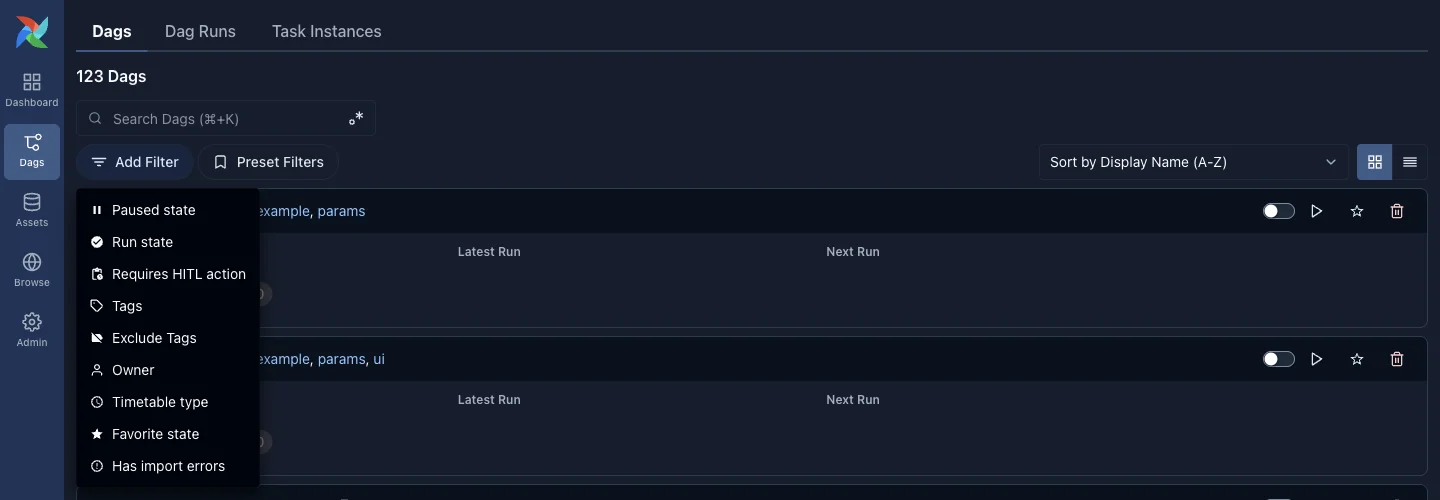
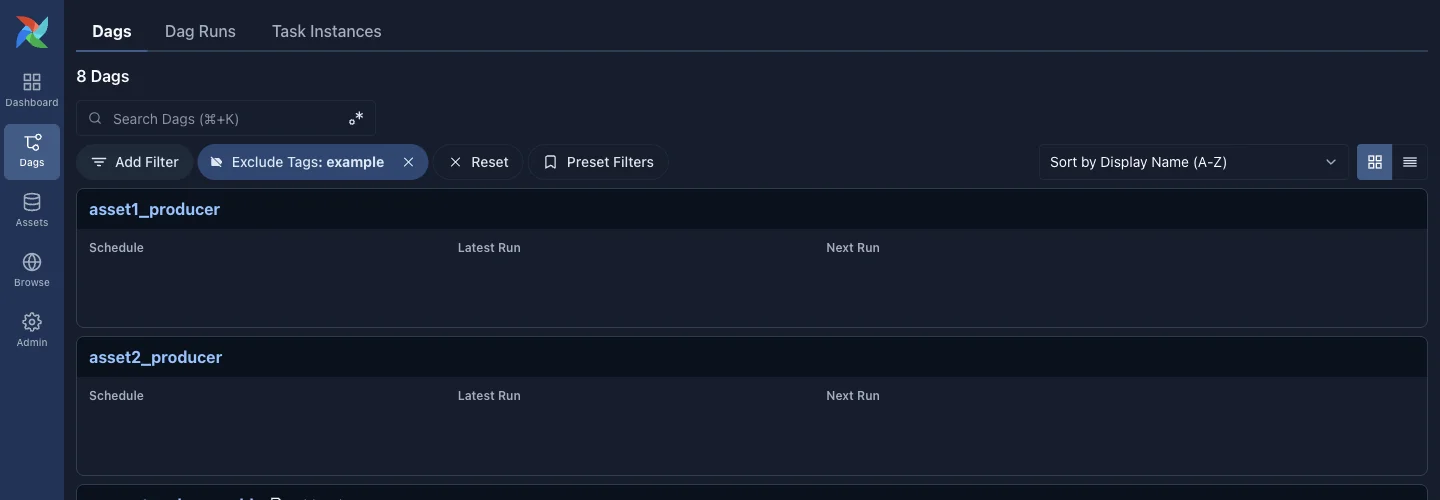
예제 DAG 123개 중 115개에 example 태그가 있다. exclude_tags=example을 걸면 8개가 남는다. 태그가 없는 asset1_producer도 그 8개에 들어 있다.
검색창의 -
검색창은 이미 |를 OR로 쓴다. etl|load는 둘 중 하나와 맞는 DAG다. 여기에 -로 시작하는 검색어는 제외로 읽게 했다.
1
2
3
4
5
6
7
8
terms = [term.strip() for term in (value.split("|") if pipe_as_or else [value]) if term.strip()]
excluded = [term[1:] for term in terms if term.startswith("-") and len(term) > 1]
if not excluded:
    return None
clauses = [not_(term_clause(term)) for term in excluded]
if included := [term for term in terms if not term.startswith("-")]:
    clauses.append(or_(*(term_clause(term) for term in included)))
return and_(*clauses)
-가 붙지 않은 검색어는 지금처럼 OR로 묶고, -가 붙은 검색어는 하나씩 NOT으로 뺀다. etl|-test는 etl과 맞으면서 test와는 맞지 않는 DAG이고, -test만 쓰면 test와 맞는 DAG를 뺀 전부다. - 하나만 입력하면 뺄 검색어가 없으니 None을 돌려, 예전처럼 -라는 글자를 찾게 한다.
term_clause를 인자로 받는 이유는 검색 파라미터가 두 갈래라서다. UI 기본 검색이 쓰는 dag_display_name_prefix_pattern은 접두 일치라, 인덱스를 타는 범위 조건(>= 'etl' AND < 'etm' 꼴)으로 바뀐다. 고급 검색이 쓰는 dag_display_name_pattern은 ILIKE '%etl%'인 부분 일치다. 두 파라미터 모두 원래 쓰던 조건 함수를 넘기면 되니, 제외 로직은 한 함수로 끝났다.
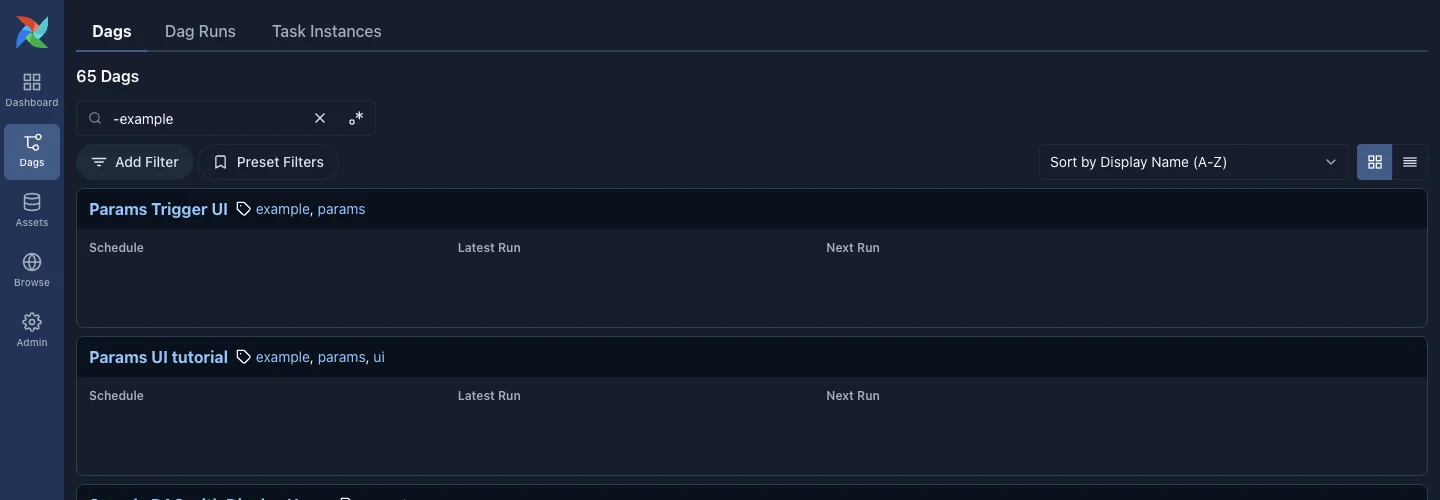
-example로 검색하면 65개가 남는다. 표시 이름이 example로 시작하는 58개가 빠진 수다. 화면 맨 위의 Params Trigger UI에는 example 태그가 붙어 있는데도 남았다. 검색은 표시 이름(dag_display_name)만 보고 태그는 보지 않기 때문이다. 태그로 빼는 기능과 이름으로 빼는 기능을 따로 둔 이유다.
-를 DAG 이름 검색에만 켠 이유
-를 제외로 읽는 건 동작 변경이다. 이전에는 DAG 이름 검색에 -foo를 넣으면 -foo라는 글자를 찾았다. 이제는 foo를 뺀다.
Airflow API에는 *_pattern, *_prefix_pattern 검색 파라미터가 많고, 그 값들이 -로 시작하지 않는다는 보장은 없다. 모든 파라미터의 뜻을 한꺼번에 바꾸면 영향 범위를 가늠하기 어렵다. 그래서 검색 파라미터 팩토리에 minus_as_not 옵션을 두고 기본값을 False로 했다. dag_display_name_pattern과 dag_display_name_prefix_pattern 두 곳에서만 True로 넘긴다.
1
Depends(search_param_factory(DagModel.dag_display_name, "dag_display_name_pattern", minus_as_not=True))
켜진 파라미터는 OpenAPI 설명에 “A term prefixed with - excludes the values it matches”가 붙고, API 설명의 “Filtering with pattern parameters” 절에도 같은 규칙을 적었다.
API 테스트는 두 파라미터 각각에서 - 제외, |와 섞은 제외, - 하나만 넣은 경우를 본다. 옵션을 켜지 않은 dag_id_pattern에 -1을 넣는 경우도 넣었다. 이때는 1을 빼지 않고 -1이라는 글자를 그대로 찾아야 한다. UI 테스트는 URL의 exclude_tags가 DAG 목록 요청에 그대로 실리는지, 필터 칩으로 보이는지, Add Filter 메뉴에 항목이 있는지 본다.
검색창 하나로 합치기
PR은 11월 26일에 열었고 리뷰를 기다리고 있다. 이 PR로는 태그를 빼려면 필터를 열고, 이름을 빼려면 검색창에 써야 한다. GitHub 검색처럼 tag:team_a -tag:deprecated를 검색창에 바로 쓰는 방식은 #77623으로 제안했다. 그 문법은 이번 PR의 exclude_tags와 - 규칙을 그대로 쓰기 때문에, 조건을 만드는 이 PR을 먼저 냈다.
English summary
The Airflow 3 DAG list could filter by tags and by name, but it could not exclude anything. My PR #77622 adds exclude_tags to the DAG list endpoints. It also adds a -term syntax to the DAG name search. For example, etl|-test means names that match etl but not test. The tag exclusion uses NOT EXISTS, so DAGs without tags stay in the list. A leading - changes how a search term is read, and other pattern parameters may search for values that start with -. So I made it opt-in and turned it on only for the two DAG display name parameters.